When building a high-performance website, choosing the right image format plays a crucial role in speed, quality, and user experience. Among the most widely used formats, PNG and JPG dominate web design, each offering distinct advantages. Understanding their differences allows us to make smarter decisions that directly impact SEO rankings, loading times, and visual appeal.
In this comprehensive guide, we explore every essential detail of PNG vs JPG, helping us determine which format performs best for websites.
Understanding PNG and JPG Formats
What is PNG (Portable Network Graphics)?
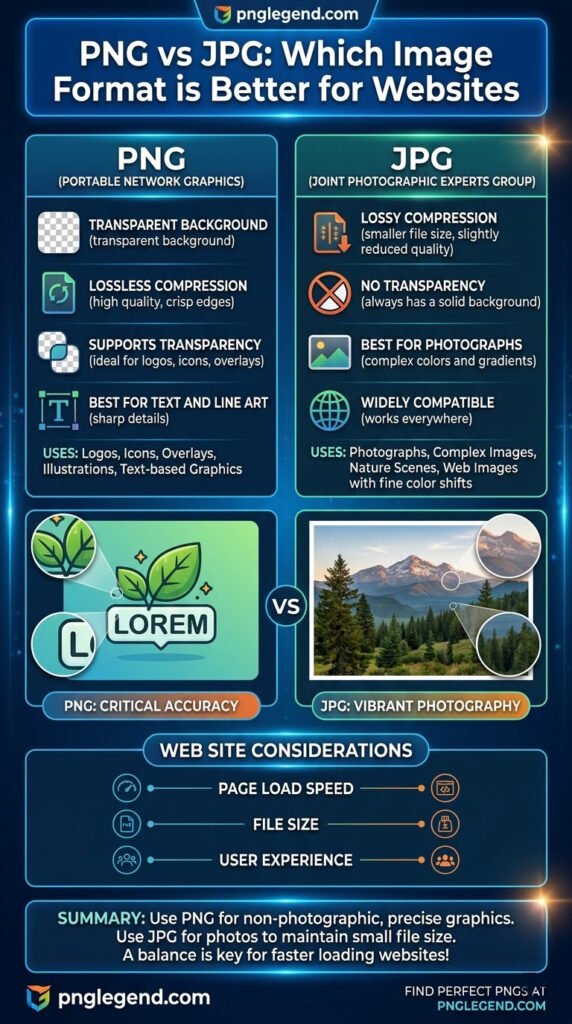
PNG is a lossless image format, meaning it preserves all image data without sacrificing quality. This makes it ideal for high-detail graphics, transparency, and crisp visuals.
Key Features of PNG
- Lossless compression ensures no quality loss
- Supports transparent backgrounds
- Ideal for logos, icons, and graphics
- Larger file sizes compared to JPG
What is JPG (JPEG – Joint Photographic Experts Group)?
JPG is a lossy compression format that reduces file size by discarding some image data. This makes it perfect for photographs and large images where smaller file size is essential.
Key Features of JPG
- Lossy compression reduces file size significantly
- Ideal for photographs and complex images
- No transparency support
- Slight quality loss during compression
PNG vs JPG: Core Differences Explained
1. Image Quality
PNG maintains perfect image quality, making it ideal for detailed visuals. JPG, on the other hand, compresses images, which can lead to visible artifacts and reduced sharpness.
Verdict:
- Choose PNG for clarity and precision
- Choose JPG for acceptable quality with smaller size
2. File Size and Website Speed
Website performance depends heavily on image size. PNG files are generally larger, while JPG files are optimized for speed.
Impact on SEO:
- Faster websites rank higher on Google
- JPG helps reduce load times significantly
Verdict:
- Use JPG for faster loading pages
- Use PNG when quality outweighs size concerns
3. Transparency Support
PNG supports alpha transparency, allowing images to blend seamlessly with backgrounds. JPG does not support transparency at all.
Best Use Cases:
- PNG: Logos, icons, overlays
- JPG: Background images, photos
Verdict:
- PNG is the only option for transparency
4. Compression Efficiency
JPG offers adjustable compression levels, allowing us to balance quality and file size. PNG uses lossless compression, meaning file sizes remain larger.
Verdict:
- JPG wins for flexibility and efficiency
5. SEO Performance
Search engines prioritize fast-loading, optimized images. While both formats can be optimized, JPG generally performs better due to smaller file sizes.
However, PNG contributes to better visual quality, which can enhance user engagement.
Verdict:
- JPG for speed-focused SEO
- PNG for design-focused engagement
When to Use PNG for Websites
We should choose PNG in scenarios where visual precision is critical:
Best Use Cases for PNG
- Logos with transparent backgrounds
- UI elements and icons
- Infographics and charts
- Text-heavy graphics
- Images requiring sharp edges
PNG ensures that every detail remains intact, making it essential for branding and design consistency.
When to Use JPG for Websites
JPG is the preferred format when performance and file size matter most:
Best Use Cases for JPG
- Photographs and realistic images
- Blog post featured images
- Background visuals
- E-commerce product images (non-transparent)
- Large banners
JPG allows us to compress images without noticeable quality loss, improving page speed significantly.
PNG vs JPG: Performance Comparison Table
| Feature | PNG | JPG |
|---|---|---|
| Compression | Lossless | Lossy |
| File Size | Large | Small |
| Image Quality | Excellent | Good (compressed) |
| Transparency | Supported | Not supported |
| Best Use Case | Graphics, logos | Photos, large images |
| SEO Impact | Moderate (size-heavy) | High (speed-friendly) |
Which Format is Better for Websites?
There is no single universal answer. The best approach is strategic usage of both formats:
- Use PNG for design elements requiring clarity and transparency
- Use JPG for photos and large visuals to improve speed
A well-optimized website leverages both formats to achieve perfect balance between performance and quality.
Advanced Optimization Tips for PNG and JPG
1. Compress Images Without Losing Quality
Use tools like:
- TinyPNG
- ImageOptim
- ShortPixel
2. Use Proper Dimensions
Always resize images before uploading. Avoid relying on CSS scaling.
3. Implement Lazy Loading
Lazy loading ensures images load only when visible, improving initial page speed.
4. Use Modern Formats Alongside PNG & JPG
Consider combining with:
- WebP
- AVIF
These formats offer superior compression and quality balance.
Common Mistakes to Avoid
- Uploading high-resolution PNGs unnecessarily
- Using JPG for logos or transparent elements
- Ignoring image compression
- Not adding alt text for SEO
- Using wrong format for the wrong purpose
Avoiding these mistakes ensures optimal website performance and better rankings.
FAQ: PNG vs JPG for Websites
1. Is PNG better than JPG for websites?
PNG is better for quality and transparency, while JPG is better for speed and performance.
2. Which format loads faster?
JPG loads faster due to smaller file sizes.
3. Should I use PNG for all images?
No. PNG should only be used when high quality or transparency is required.
4. Is JPG good for SEO?
Yes. JPG improves page load speed, which is a critical ranking factor.
5. Can I convert PNG to JPG?
Yes, but transparency will be lost, and quality may slightly degrade.
Conclusion
Selecting between PNG and JPG is not about choosing one over the other—it is about using each format strategically. PNG delivers unmatched quality and transparency, making it essential for design elements. JPG, with its efficient compression, ensures faster loading times and better SEO performance.
By combining both formats intelligently, we can build websites that are visually stunning, fast-loading, and highly optimized for search engines. The key lies in understanding the strengths of each format and applying them where they perform best.er experience and strengthens online branding.
3 Responses
I thoroughly enjoyed reading this well-crafted article; congratulations on such great work!
thank you